
The format isn't the problem. The design is.
According to Microsoft's large-scale analysis of remote meeting behavior, email multitasking occurred in roughly 30% of remote meetings and file multitasking in about 25% — and both increased dramatically in longer sessions. That's not an attention-span problem. It's a design problem.
This article covers what actually separates effective virtual corporate training from sessions employees forget by Friday: clear objectives, intentional engagement design, skilled facilitation, and measurement that connects to real behavior change.
Key Takeaways
- Virtual training fails from poor design and passive delivery, not the platform you use
- Set specific outcomes and send a pre-session survey before any training begins
- Build interaction into every 10–15 minutes of content; don't rely on lecture
- Breakout groups of 3–4 people replicate small-group dialogue effectively
- Measure immediate reactions and downstream behavior change, not just satisfaction scores
Why Virtual Corporate Training Often Falls Short
Most virtual training fails before the first slide appears. The common culprits aren't hard to spot once you know what to look for.
The Passive Observer Problem
When training becomes a one-way broadcast — a presenter talking while participants quietly watch — engagement collapses fast. Without the social pressure of being in a room together, participants disengage, multitask, or mentally check out.
Microsoft research found that meetings with more than 10 attendees had 6.21x the odds of email multitasking compared to meetings of 1–2 people. Larger virtual training groups face the same dynamic.
The result is individual passive consumption instead of the peer dialogue and collaborative sense-making that produce lasting behavior change.
Other Failure Points Worth Naming
Several specific design failures compound the passive observer problem:
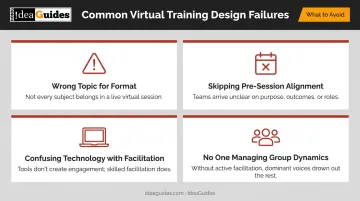
- Choosing the wrong topics for the format. Highly emotional or relational topics are harder to navigate without in-person nonverbal cues and physical presence.
- Skipping pre-session alignment. Participants who don't know why they're there or what's expected of them arrive disengaged before anyone says a word.
- Confusing technology with facilitation. A good platform doesn't compensate for a poorly designed agenda or a presenter reading slides.
- No one managing group dynamics. Without a skilled facilitator, dominant voices take over and quieter participants never contribute.
Virtual training works — when it's designed for the format. That means structuring participation from the start, not retrofitting an in-person agenda for a Zoom window.
Start Right: Set Clear Objectives and Expectations
The single highest-leverage thing you can do for virtual training happens before the session starts.
Define Specific Outcomes First
Vague objectives produce vague results. Before designing any session, define exactly what participants should know, decide, or be able to do by the end. "Understand our communication framework" is not an objective. "Practice giving structured feedback using the SBI model in two simulated scenarios" is.
Specific outcomes give the facilitator a design target — and give participants a clear reason to show up fully.
Send a Pre-Session Survey
A brief survey sent 3–5 days before the session does something a generic agenda can't: it tells you what the actual audience needs. Ask what participants most want to learn, what challenges they're currently facing, and what they'd find most useful. This information allows the session to be customized to the real audience rather than a hypothetical one — and it signals that their input matters before the training even begins.
This is the same approach IdeaGuides takes before every facilitation engagement — stakeholder interviews and pre-session surveys that shape the agenda around actual client goals, not a generic template.
Open with a Senior Leader
Once pre-session prep is done, how the session opens sets everything else in motion. A sponsor or senior leader opening sends an immediate signal: this training matters to the organization.
That opening should be specific — why this topic, why now, and what full participation looks like (cameras on, names visible, active contribution in chat and breakouts). Done right, it tells participants exactly what's expected of them before the facilitator says a word.
Design for Engagement, Not Just Information Delivery
Learning is not passive consumption. People retain information when they interact with it, apply it, and discuss it with others. Every virtual training session should be designed around dialogue and application, not slideshow delivery.
Build Interaction Into the Session Structure
ATD's facilitation guidance recommends an interactive element every 3–5 minutes in virtual settings. The reason isn't that attention spans are exactly that short; regular interaction keeps participants active rather than passive. Treat that cadence as practitioner guidance, not a rigid rule, but let it shape your session design.
Techniques that work well in virtual formats:
- Live polls to surface participant perspectives before presenting a concept — this inverts the usual order and creates immediate relevance
- Breakout rooms for small-group processing of ideas (ATD recommends 3–4 people per group so no one can hide)
- Chat prompts for quick reflection or reaction without requiring people to unmute
- Virtual whiteboards for collaborative problem-solving or idea mapping
- Real-time Q&A built into the agenda, not tacked on at the end
Keep Groups Small
Smaller groups generate meaningfully higher participation. When a participant is one of 5 rather than one of 50, they feel accountable — and they're far more likely to speak up. For live, facilitated virtual training sessions, groups of 15 or fewer tend to function best for genuine dialogue.
IdeaGuides' facilitation philosophy centers on equalizing participation: what they describe as "leveling the interactive playing field" so every participant contributes meaningfully, not just the loudest voices. In practice, this means building in both introverted-friendly processes (written idea generation, anonymous input) and extroverted-friendly ones (discussion, verbal sharing). The goal is a session design that doesn't systematically favor one personality type over another.
Alternate Formats Every 10–15 Minutes
Long stretches of any single format — lecture, discussion, or activity — erode attention. A reliable structure that works in virtual training:
- Brief instruction (concept or framework)
- Small-group breakout to discuss or apply
- Whole-group debrief
- Reflection or individual commitment
- Repeat with the next concept
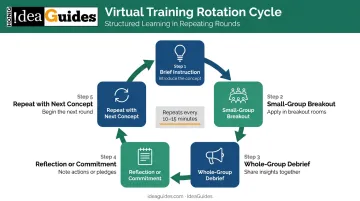
This rotation prevents cognitive fatigue and keeps participants active throughout.
Structure Sessions to Maximize Active Participation
Engagement principles only work if the session structure enforces them. Here's what that looks like in practice.
Camera and Presence Norms
One important nuance from the research: a 2021 field study on camera fatigue found that mandatory camera use increased fatigue — which was negatively related to voice and engagement, particularly for women and newer employees. The same Microsoft study found that 32% of participants linked turning off cameras with increased multitasking.
Camera policy involves a genuine trade-off. Encourage cameras on as a participation norm and explain why — it restores some nonverbal communication and reduces the temptation to multitask. For sessions longer than 90 minutes, build in breaks to offset fatigue rather than abandoning the norm entirely.
Full names displayed — not usernames or initials — is a simple, low-friction norm that improves social presence and accountability.
Use Breakout Rooms as Small-Group Tables
Breakout rooms are the virtual equivalent of small-group table discussions in in-person training. They work when they're structured:
- Assign groups of 3–4 (ATD's recommendation for maximum contribution)
- Give each group a specific question or task, not an open-ended prompt
- Assign a timekeeper or group lead in advance
- Debrief in the full group immediately after
Running breakouts every 15–20 minutes replicates the peer dialogue that makes in-person training stick.
End with Individual Commitments
General takeaways don't change behavior. Specific commitments do. At the close of every session — and ideally after each major section — each participant should articulate 1–2 concrete actions they'll take. Writing it down, saying it aloud to a partner in a breakout room, or submitting it via chat all work. The act of committing publicly increases follow-through.
Use a Trained Facilitator
A subject-matter expert and a skilled facilitator are not the same role. The distinction matters:
- Content experts know the material and deliver information
- Facilitators manage group dynamics, draw out quieter participants, and ensure sessions produce outcomes — not just coverage
Conflating these roles is one of the most common virtual training mistakes.
IdeaGuides' facilitators specialize in navigating difficult group dynamics — dominating personalities, disengaged participants, and uneven energy — in both in-person and remote sessions via Zoom.
Select the Right Format and Technology for Your Goals
Not all virtual training is the same. Format choice should follow learning goals, not convenience.
| Format | Best For | Watch Out For |
|---|---|---|
| Synchronous (live, facilitated) | Discussion, skill practice, collaboration, decision-making | Meeting fatigue, multitasking exposure, scheduling constraints |
| Asynchronous (self-paced LMS) | Compliance, foundational content, reference material | Requires self-direction; transfer depends heavily on motivation and follow-up |
| Blended | Combining pre-work with live application and peer feedback | No universal blend works for every topic |
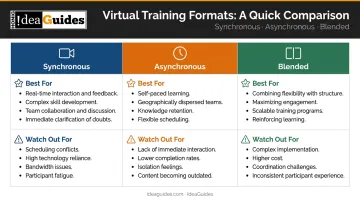
ATD's 2025 State of the Industry report, covering 539 organizations, found that nearly 60% used live instructor-led virtual classrooms in 2024, while 40% used asynchronous or self-paced formats. The takeaway isn't that one is better — it's that the wrong format for your objective will undermine even well-designed content.
If you're running live, facilitated sessions, technology selection follows from design — not the other way around. The platform needs to support what the session requires:
- Breakout room functionality
- Polling tools
- Screen sharing and annotation
- Chat function
- Session recording
Start with your instructional design. Identify what the session requires, then find the platform that fits. Choosing a platform first and designing around its constraints is one of the most common mistakes in virtual training.
Reinforce and Measure Learning After the Session
Most virtual training value is lost in the days after the session ends — not during it.
The 70/20/10 Principle
The 70/20/10 model from the Center for Creative Leadership holds that roughly 70% of practical skill development comes from on-the-job experience, 20% from peer interaction and coaching, and 10% from formal training. CCL presents this as a leadership development guideline, not a precise formula — but the implication is clear: the formal training session is the starting point, not the destination.
Design virtual training sessions to launch and reinforce the 70% and 20%, not to stand alone.
Post-Session Reinforcement Mechanisms
Practical follow-up actions that support transfer:
- Post-session recap document summarizing key decisions, commitments, and tools covered
- Manager briefing so direct supervisors understand what was covered and can reinforce it
- Follow-up check-in 2–4 weeks later to review commitment completion and surface obstacles
- Proprietary reference materials participants can use back on the job — IdeaGuides, for example, provides participants in programs like Leading Effective Meetings and Finding the Solution with workbooks and tool cards specifically designed for ongoing workplace application
Those reinforcement activities only hold up if you can tell whether they're working. That's where measurement comes in.
Measure at Two Levels
Effective measurement uses both immediate and longer-term indicators:
Leading indicators (captured during and immediately after the session):
- Engagement and participation rates
- Post-session survey scores (Kirkpatrick Level 1: Reaction)
- Knowledge or skill checks (Level 2: Learning)
Lagging indicators (captured 30–60 days later):
- Observed behavior change on the job (Level 3: Behavior)
- Performance metrics and team feedback (Level 4: Results)
- Commitment completion rates from end-of-session action plans
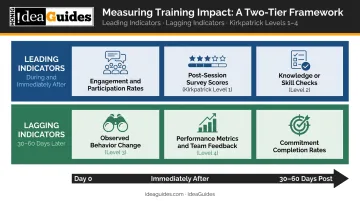
CIPD cautions that evaluation should connect learning activity to actual transfer and organizational impact, not stop at participation counts or satisfaction surveys. Track what changed on the job at 30 and 60 days, then use that data to adjust the next program before it runs.
Frequently Asked Questions
What is the 70/20/10 rule for training?
The 70/20/10 model holds that 70% of learning comes from on-the-job experience, 20% from peer interaction and coaching, and 10% from formal training events. Virtual training sessions are most effective when designed to support application and peer reinforcement — not treated as standalone events.
What's the best platform for virtual corporate training?
It depends on your goals. Live, facilitated sessions need video conferencing with breakout rooms and polling (Zoom, Teams, and Webex all support this). Structured self-paced learning calls for an LMS. Platform choice matters far less than session design and facilitation quality — don't let the tool substitute for a clear instructional plan.
What makes virtual corporate training different from in-person training?
Virtual training loses nonverbal communication cues, makes group energy harder to read, and significantly increases the risk of passive participation. It requires more deliberate facilitation, more structured interaction, and shorter content segments than a typical in-person session to achieve comparable engagement and retention.
How long should a virtual corporate training session be?
ATD's guidance identifies 90 minutes as a practical target for virtual instructor-led training, with learning segments ideally kept to 2 hours or less. Sessions beyond 3 hours significantly increase cognitive fatigue, so multi-day training is almost always better split into shorter, focused modules with time between them for application.
How do you keep employees engaged during virtual training?
Alternate formats every 10–15 minutes, use breakout rooms for small-group discussion, incorporate polls and chat prompts, keep live groups to 15 or fewer participants, and ensure every participant leaves each segment with a specific reflection or action item.
How do you measure the effectiveness of virtual corporate training?
Use a two-layer approach: immediate measures collected during and after the session (engagement data, post-session surveys, knowledge checks) and downstream measures collected 30–60 days later (behavior change observed by managers, performance improvements, commitment completion rates).